Self learning memory v2: hooks

This is the second post in a two-part series. The first post describes the memory bank approach I built on top of Cline's original concept, including the short-term/long-term split and automated learning transfer. This post describes what comes next.
The problem with instruction-driven memory
After months of running memory banks across our repos, two problems persisted no matter how carefully I wrote the instructions.
- Reliability. The memory bank depends on the AI choosing to read it, choosing to update it, and the user remembering trigger phrases. On a good day, this works. On a Tuesday afternoon when you're debugging a production issue and forget to say "read the memory bank," Claude starts from zero. The system's value is proportional to how often people remember to use it, which is not often enough.
- Scale. A flat set of six files works for a small project. In a monolith with hundreds of modules, a flat memory bank becomes a liability. You either load every file into context every session (burning tokens on irrelevant content and diluting the signal) or you rely on the AI to smartly pick the right docs to read (which it gets wrong often enough to matter). Our systemPatterns.md grew past 500 lines. Most of it was overkill to any given task.
The insight: hooks are reliable, prompts are not
Claude Code supports lifecycle hooks: scripts/etc that can fire at specific events during a session. A PreToolUse hook runs before every tool call. A Stop hook runs when a session ends. These are deterministic. They fire every time, regardless of what the AI decides to do.
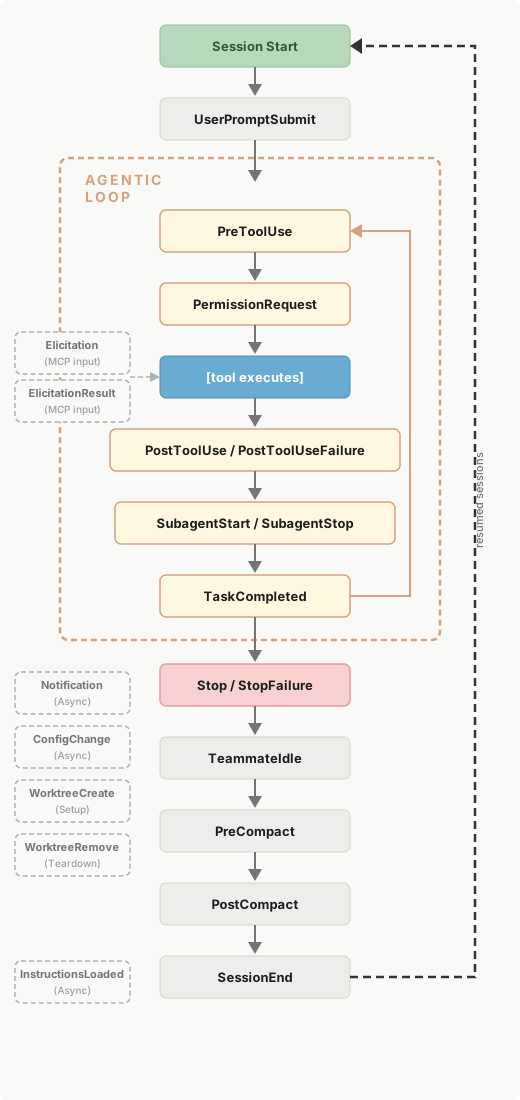
This is the key difference. Instead of instructing the AI "please read the memory bank before starting work," a hook reads it automatically. Instead of hoping the AI updates the memory bank at session end, a hook processes learnings mechanically. The AI doesn't need to cooperate. The system works because hooks are infrastructure, not suggestions.
The Librarian
The Librarian is a Claude Code plugin built on two hooks and a hierarchical file structure.
Hierarchical context, not flat files
The memory library mirrors the repo's file tree:
_memory_library/
    patterns.md                      -- repo-wide conventions
    tech.md                          -- tech stack, commands
    product.md                       -- business context
    models/
        stage/
            feature_analytics/
                patterns.md          -- feature analytics patterns
        launch/
            btbi/
                migration.md         -- BTBI migration guide
                patterns.md          -- BTBI-specific conventions
        curated/
            builder_reports/
                domo_workflow.md      -- DOMO table workflow
    .scratch.md                      -- pending learnings (staging area)
Each directory can hold any number of .md files with context relevant to that level of the codebase. File names are descriptive: patterns.md for conventions, tech.md for setup, edge.md for gotchas. No rigid template. The content drives the structure.
This solves the scale problem. In a monolith with hundreds of modules, each module's knowledge lives at its own path. Global conventions live at the root. The context that gets loaded depends on where you're working.
The walk-up: scoped context loading
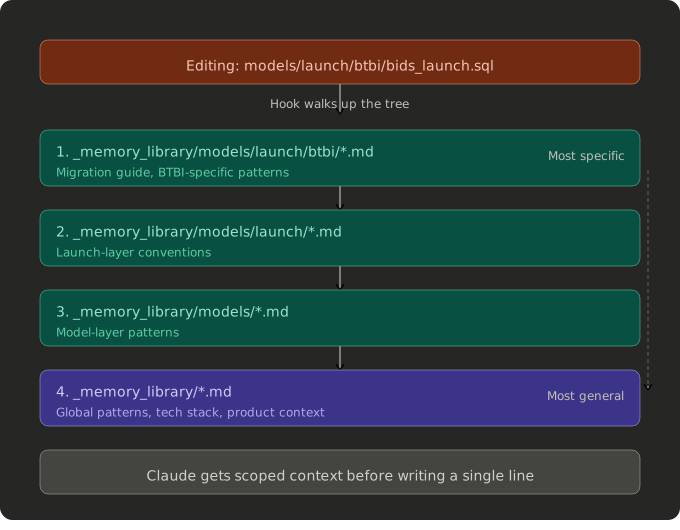
When Claude edits a file at models/launch/btbi/bids_launch.sql, the PreToolUse hook walks up the library tree and loads:
_memory_library/models/launch/btbi/*.md(BTBI migration guide, patterns)_memory_library/models/launch/*.md(launch-layer patterns, if any)_memory_library/models/*.md(model-layer patterns, if any)_memory_library/*.md(global patterns, tech, product)
Most specific first, most general last. A developer working on BTBI models gets the BTBI migration guide automatically. A developer working on DOMO tables gets the DOMO workflow guide. Both get the global conventions. Neither gets the other's specialized context.
This is not a feature you can replicate with instructions. An instruction-driven memory bank would need to say "read the files relevant to the path you're working on." The AI would need to figure out which files are relevant, navigate the directory, and load them selectively. Sometimes it would get it right. The hook gets it right every time because it's a shell script that follows the directory structure mechanically.
Once the context window rolls forward, there's no guarantee that instruction is still going to be followed.
How the PreToolUse hook works
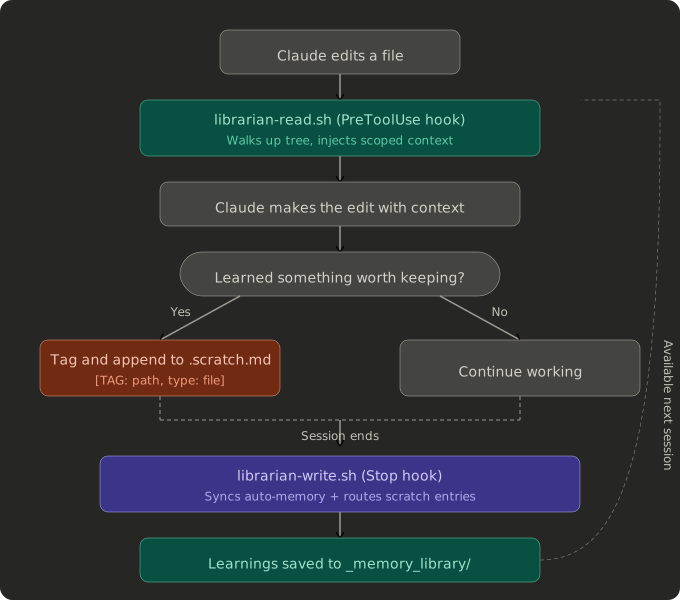
The hook receives JSON on stdin with the file path being edited. It walks up the file's directory tree to find the nearest _memory_library/, computes the relative path, then collects all .md files from each ancestor directory. It outputs a JSON response with the collected context in an additionalContext field, which Claude receives as a system-level injection before executing the edit.
[Librarian] Memory library context for models/launch/btbi/bids_launch.sql:

--- [models/launch/btbi/migration.md] ---
# BTBI Launch Model Migration Guide
...

--- [global/patterns.md] ---
# System Patterns
...
Claude sees this as part of its conversation context. It doesn't need to be asked. It doesn't need to read files. The context is there before it writes a single line.
Tagging: the AI decides, the hook executes
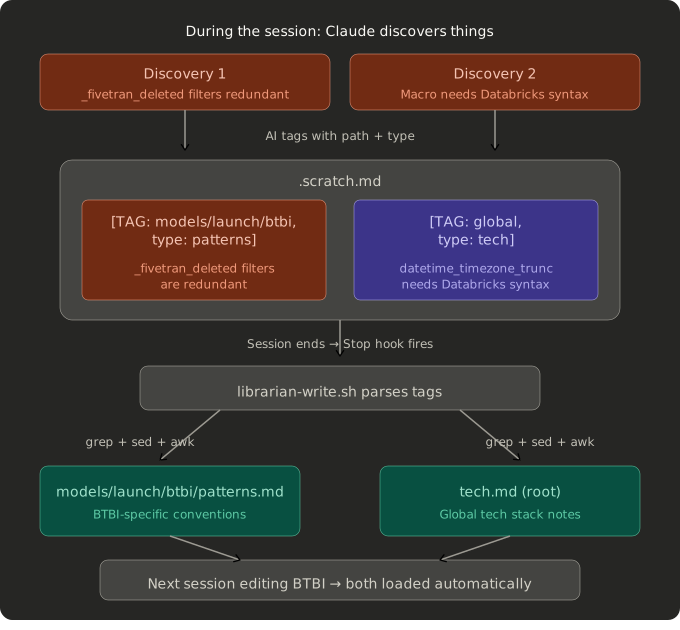
During a session, Claude discovers things. A column that's mapped twice in a raw model. A macro that uses BigQuery syntax instead of Databricks. A pattern that every BTBI migration needs to follow.
In the memory bank model, the AI would need to decide where to write this, open the right file, and append it correctly. Sometimes it does. Sometimes it doesn't.
In the Librarian model, Claude appends a tagged entry to .scratch.md:
## [TAG: models/launch/btbi, type: patterns]
- Legacy _fivetran_deleted filters are redundant with new replication
- Always use LEFT JOINs when removing export_builders_seed

## [TAG: global, type: tech]
- datetime_timezone_trunc macro needs Databricks syntax, not BigQuery
The tag has two fields:
path: which directory in the library (e.g.,models/launch/btbiorglobalfor root)type: which.mdfile (e.g.,patterns,tech,edge,troubleshooting)
The AI makes the routing decision at the moment of discovery, when it has full context about what it learned and where it applies. It doesn't need to navigate the library, find the right file, read it, and decide where to insert the learning. It just tags.
How the Stop hook works
When the session ends, the Stop hook does two things.
Phase 1: Auto-memory sync. Claude Code has a built-in memory system at ~/.claude/projects/.../memory/ where it saves user feedback and preferences. This is personal and local. The stop hook scans this directory for entries modified in the last two hours, parses their frontmatter, and appends them to .scratch.md with appropriate tags. Feedback type maps to patterns. Project type maps to product. Reference type maps to tech. User type is skipped (personal preferences don't belong in a shared repo).
This bridges a gap. When a developer tells Claude "always run dbt build after creating models" and Claude saves it to auto-memory, that feedback also flows into _memory_library/patterns.md. The next developer on the team benefits from it without anyone doing anything.
Phase 2: Deterministic routing. The hook parses .scratch.md, reads each ## [TAG: path, type: file] header, and appends the content block to _memory_library/<path>/<file>.md. If the file doesn't exist, it creates it with a heading. If the entry has no type: field (legacy format), it stays in scratch for manual processing.
No LLM involved. No judgment calls. grep, sed, awk, and file writes. The routing decision was already made by the AI at tagging time. The hook just applies it.
I tried using an LLM agent hook to do intelligent routing at session end. Claude Code's agent hooks turned out to be read-only. I tried prompt hooks that return routing decisions as JSON. They only return ok: true/false. So I arrived at this design: the AI decides the metadata, the shell script executes the routing. It's the right separation of concerns anyway. LLMs are good at understanding context and categorizing knowledge. Shell scripts are good at moving files around. Let each do what it's good at.
What about the learning transfer?
The memory bank's most valuable feature was the end-project workflow that promotes short-term learnings to long-term files. Does the Librarian still do this?
Yes, but differently. There is no "end project" command because there is no short-term/long-term distinction in the file structure. The library is organized by location in the codebase, not by temporal relevance. Every entry is "long-term" in the sense that it persists until someone removes it.
The equivalent of the learning transfer happens continuously through tagging. When Claude discovers that "raw models already hardcode _fivetran_deleted as false," it tags it immediately to the relevant path. There is no staging period, no waiting for an end-of-project trigger. The knowledge flows to its permanent home during the session, not after it.
The .scratch.md file serves as a brief staging area, but entries are processed at session end. Anything with a proper tag gets routed. The typical lifecycle of a learning is: discovered during work, tagged to scratch, routed to library file within the same session.
Memory bank vs. Librarian: when to use which
The memory bank is simpler to set up and works in any AI environment that supports system prompts. If you're using Cursor, Windsurf, Cline itself, or any tool without a hook system, the memory bank is your option. The short-term/long-term split with explicit learning transfer is a meaningful upgrade over Cline's flat approach.
The Librarian requires Claude Code with plugin support. If you have that, the benefits are significant:
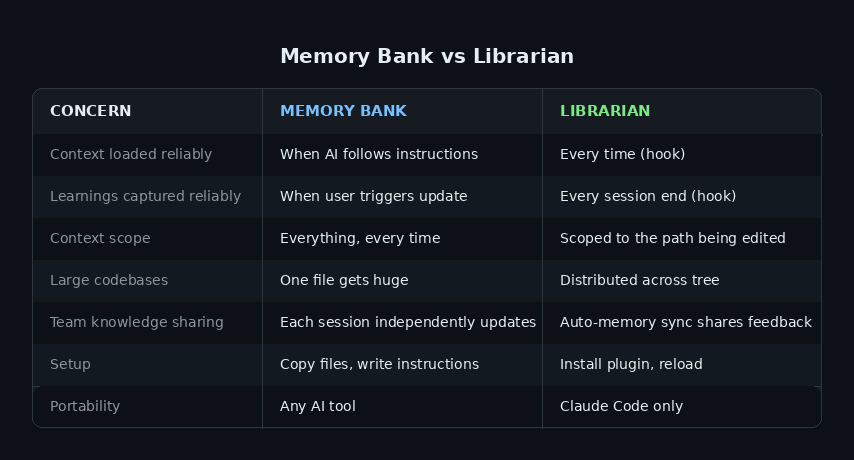
For small projects or single-developer workflows, the memory bank is fine. For team repos with hundreds of files and multiple active areas of development, the Librarian's scoped context and automated hooks make a real difference.
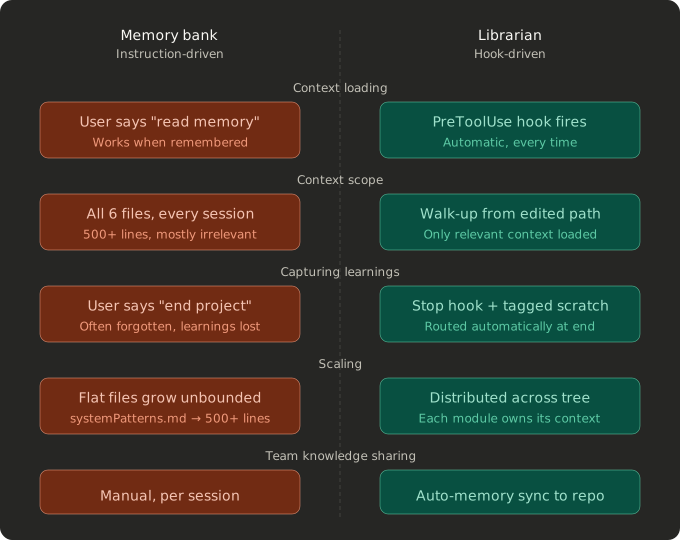
The practical difference
The best way to illustrate the difference is a real session.
With a memory bank: You open a new Claude session. You say "read the memory bank." Claude reads six files. You start working on a BTBI model migration. Claude has the full system patterns (500 lines) loaded, most of which is irrelevant to BTBI. It figures out the migration pattern by reading the legacy model and existing examples. At the end, you forget to say "update memory bank." The migration patterns Claude discovered are lost.
With the Librarian: You open a new Claude session. You start editing a BTBI model. The hook fires before the edit, loading the BTBI migration guide (15 lines, exactly relevant) plus global patterns (120 lines of repo conventions). Claude already knows the migration steps. It creates the model, tags two learnings about a column mapping gotcha it found, and the session ends. The stop hook routes those learnings to _memory_library/models/launch/btbi/edge.md. Next session, anyone editing BTBI models gets that gotcha automatically.
No trigger phrases. No manual updates. No forgotten learnings. Just hooks that fire every time.
Getting started
If you're using Claude Code with the Buildertrend AI Tools marketplace:
/plugin marketplace add https://github.com/mdatla/ai-tools.git
/plugin install librarian
/reload-plugins
If you already have a memory bank, /import-library converts it to the hierarchical format. Otherwise, mkdir _memory_library and start working.
The plugin has zero external dependencies. Native bash and PowerShell only. Debug logs go to ~/.claude/librarian.log so you can verify hooks are firing.
Full documentation is in the plugin README on the github repo
Comments ()